
Cricut Angel Policy & Terms of Use Updated | A Brief Guide


Today, we’re diving into something a little less crafty and a little more legal. Yep, I’m talking about the recent updates to the Cricut Angel Policy, their Terms of Use, and the Privacy Policy.
Now, I know this stuff is long, boring, and wordy (seriously, have you seen Cricut’s legal documents? They scroll forever). But if you use a Cricut machine for fun or you run a small business selling Cricut projects, you really need to understand the basics of these rules.

⚠️ Quick disclaimer: I’m not a lawyer. I’m a crafter (like you) who reads through these things so you don’t have to. If you ever feel unsure about selling products, talk to a lawyer who specializes in copyright or small business law.
That said, let’s break this all down in plain English. We’ll go through the five big ticket items (plus a couple bonus ones) so you know exactly what you can and can’t do with your Cricut designs.

1. Uploaded Content: What Happens to Your Files
One of the biggest updates in the Cricut Angel policy and Terms of Use has to do with the files we upload into Cricut Design Space.
When you upload something to Design Space, whether it’s one of your SVG files, something you bought, or even something you designed yourself, Cricut’s Terms say you’re giving them a “perpetual, irrevocable, worldwide, royalty-free license” to use it.
That means if you upload an SVG and make it public, Cricut technically has the right to:
- Share it with other users
- Use it in advertising
- Create derivative designs based on it
- Keep it on their servers indefinitely
⚠️ Takeaway: If you use my free SVG files or your own designs, keep them private in Design Space. Once you flip that project to “public,” Cricut can do whatever they want with it.
Check out all my free files here!
This is a big concern for Cricut users who share designs or rely on uploaded content for their business. Reminder that you’re not saving files to your computer when you use Cricut Design Space. You’re saving them to Cricut’s servers. That means they always have access, whether or not you intended to share.
2. Cricut’s AI Images & Why They’re Off-Limits for Selling
Cricut recently added an AI feature in beta to help people generate images. Sounds cool, right? But here’s the catch: anything you make with this AI is not covered under Cricut’s Angel Policy.
That means you can’t sell products made from Cricut AI designs. Period.
This is especially upsetting for professional designers who worry Cricut’s AI could undercut their original design work. Imagine you create a gorgeous file, and then someone asks Cricut AI to make something almost identical for free. It’s frustrating, and it muddies the water around ownership.
⚠️ Takeaway: If you play with Cricut’s AI tool, treat those files as personal use only. No selling, no commercial use, no Etsy listings.
3. Licensed Characters: Still a No-Go
This part hasn’t really changed, but it’s worth repeating because it’s one of the biggest reasons people get in trouble.
You cannot sell items using licensed characters in Cricut Design Space. That includes:
- Disney
- Marvel
- Hello Kitty
- Sesame Street
- Peanuts
- Any other copyrighted brands or characters
Why? Because Cricut doesn’t own those rights, the copyright owners do. Companies like Disney and Sanrio (Hello Kitty) are very protective of their brands, and they have legal teams watching Etsy and other online shops.
On top of that, Cricut now says you can’t use anything marked with the Contributing Artist Program purple star for commercial use. Those designs are off-limits for selling, even if you have a Cricut Access membership.
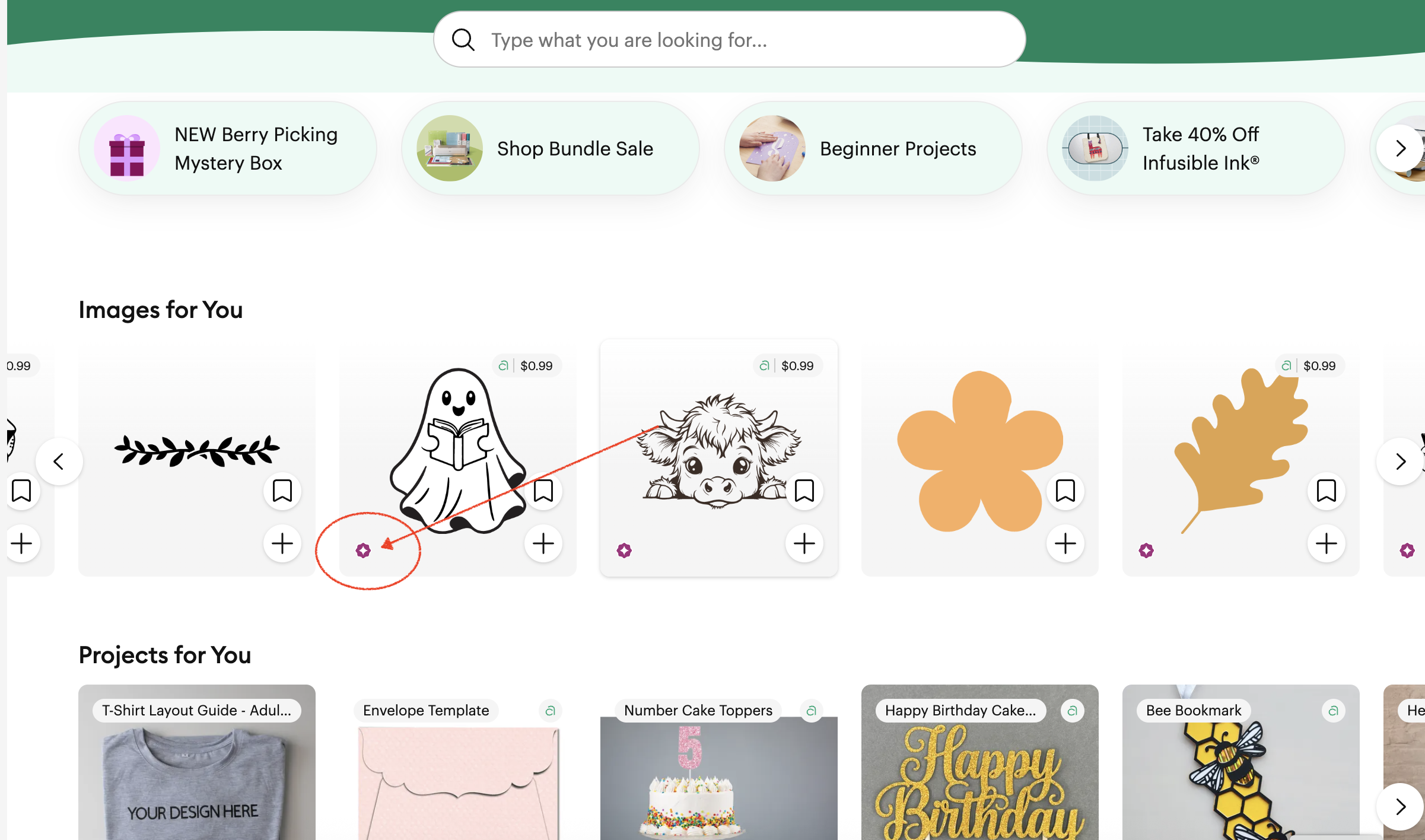
⚠️ Takeaway: Stick to your own designs, third-party SVGs (like the ones I share for free), or Cricut content that’s clearly allowed under Cricut’s Angel Policy.
4. What You Can Sell vs. What You Can’t
Let’s get clear on this, because it’s the heart of the Cricut Angel policy.
✅ Approved Finished Products (okay to sell):
- Greeting cards
- T-shirts
- Scrapbook pages
- Cake toppers
- Other completed projects
❌ Not Allowed:
- Kits
- Templates
- Unassembled materials for someone else to put together
- Sticker sheets (yes, even individual stickers are banned if made from Cricut Design Space images)
That last one shocks a lot of Cricut crafters. According to the policy, stickers count as “multiple individual cuts,” so Cricut doesn’t allow them for commercial use.
⚠️ Takeaway: If you run a small business selling stickers, you need to use your own designs or third-party SVGs, not Cricut Design Space content.
5. Mass Production & Unit Limits
Cricut also added clarity about mass production. If you’re selling products made with Cricut images, you’re capped at 10,000 total units. That’s across your entire product line, not per item.
So you can’t make: 10,000 mugs + 10,000 shirts + 10,000 cards. You can only make 10,000 items total.
This applies if you’re using Cricut images. If you’re selling products made with your own SVGs, this cap doesn’t apply.
⚠️ Takeaway: For businesses scaling up, Cricut limits what you can do without a separate commercial license (which Cricut doesn’t currently offer).
6. Privacy Policy & Account Risks
The updated privacy policy also affects Cricut users. Here’s what’s happening:
- Cricut collects your device info, browsing history, projects created, uploaded digital content, and purchase history.
- Some of that data can be sold to advertising partners.
- If you cancel Cricut Access, your projects stay, but you’ll lose access to subscription-only images.
- If you delete your entire account, all of your designs are wiped permanently.
⚠️ Takeaway: If you’re unhappy with Cricut, canceling Cricut Access is safer than deleting your account completely.
Final Thoughts: What This Means for Cricut Crafters
So, what does all this mean for you?
Here’s my straight-up advice:
- Use your own designs or trusted third-party SVG files if you plan to sell, check licenses ALWAYS.
- Keep any uploads private in Cricut Design Space.
- Don’t sell stickers, templates, or kits using Cricut content.
- Remember the 10,000-unit cap if you’re working with Cricut’s designs.
- Protect your business by reading the Cricut Angel policy and terms of use yourself before launching new products.
I’ve been crafting for years without Cricut Access, and I’ve been just fine. If you’re looking for free images, tutorials, and original SVGs, check out my Community Vault, everything there is designed with small businesses in mind.
At the end of the day, Cricut is still an amazing tool, but the legal side can get messy.
Stay informed, stay cautious, and as always, stay crafty!



Can you clarify steps on uploading as private?
Navigate to the project tile in My Stuff, select the Share icon, and choose the option to Make Private or Make Public.
This was very informative. Thank you.
Thank you for breaking down the legal jargon into bite sized pieces. Very helpful to have the highlights.
Blessings,
Joan
Thank you, Kelsey! This was a very nice summary!
How do you make something you download as private? Is it private unless you share it?
Yes or if its on, its public until made private. I keep my stuff always private but you navigate to the project tile in My Stuff, select the Share icon, and choose the option to Make Private or Public.
Thank you so much for laying the main parts of the new policy for Cricut. The time and effort is much appreciate especially for the majority of us that don’t read thru the whole thing or even a small portion. I know I don’t want to loose what I’ve worked on.
Love your designs and appreciate those as well.
Have a lovely crafting time
Thank you for taking the time to explain all this in easy to understand terms. It was very helpful for me.
Wow. Thanks for breaking this down. I think I’ll stick with my Silhouette Cameo.
Thank you for breaking things down in simple terms. I appreciate it. Pam
I’m a retired lawyer with experience in copyright law, and I’m pretty sure you can’t give someone rights you don’t yourself have, so if you yourself don’t have commercial rights in a product you can’t give someone else commercial rights. Since I’m retired and no longer am licensed to practice, this is just my personal take, but someone with an active legal license might want to weigh in on this.
This makes sense that they can’t give rights but I could also think in the future they could contract these contributing artists and say we are including licenses or even in their terms and conditions add a clause that they have distribution rights as they kind of have already. I don’t know if I make sense.
so the take away from this is DO NOT SHARE, keep everything PRIVATE. Silly really, because it is great and encouraging to learn from others.
I agree but for my files, I ask that you don’t
I did what you said about “My Stuff” and the “Share icon” to make projects private BUT there is no “Share” icon anywhere. I have version 100 which I thought was the latest version.
Hi! I cannot add a picture. When you are in my stuff and you click on a project above customize there is a share slightly curved arrow. That is how you would share but to make public you would need to add project photos as well.
Your review answered a question I had about stickers. Thanks.
The Angel Policy covers what other Users can do if uploaded content is shared publicaly vs. kept private.
The irrevocable license covers what Cricut can do with your uploaded content as described in the Terms of Agreement. Very different!!!!!
You’re exactly right, thanks for pointing that out! The Cricut Angel Policy is about what other users can do with projects you share publicly in Design Space, while the irrevocable license in the Terms of Use covers what Cricut itself can do with anything you upload (even if it’s private).
In my blog, I was focusing more on how both of these affect us as crafters in real life, basically, keep files private and avoid sharing in the community gallery if you don’t want Cricut or other users reusing them. But I appreciate the distinction you made, because it helps show why both documents matter in different ways.